
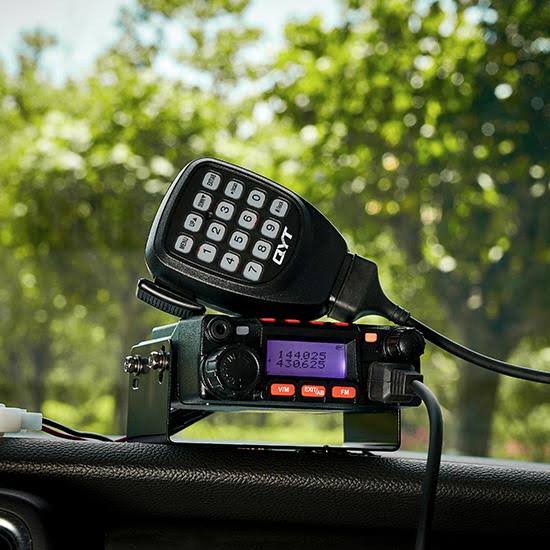
If you’ve ever wanted a proper radio in your vehicle without giving up dash space, the KT8900 is worth a look. It’s a compact dual-band mobile transceiver, and the manual shows it packs in more than its size suggests. Here’s what it offers and how to get started.
The headline specs
- Bands: VHF 136-174 MHz and UHF 400-480 MHz (with extended ranges listed beyond that)
- Power output: 25 W on VHF, 20 W on UHF, with a high/low power switch
- Memory: 200 channels
- Supply voltage: 13.8 V DC, so it suits a 12 V vehicle system
- Size and weight: 98 × 35 × 118 mm and just 408 g
- Operating temperature: -20 to +60 °C
- The front panel is simple: a power key, volume knob, channel knob, a call key, a monitor key, and an FM radio button.
- There’s an RJ-style microphone socket and a data port for programming.
- The supplied microphone has a full keypad, and that is where most of the setup happens.
- Dual standby display
The radio shows two frequencies at once, A and B. With TDR (dual-frequency standby) on, it listens to both. Press EXIT/AB to switch which one you transmit on, and V/M to flip between frequency mode and channel mode.
Setting it up from the mic keypad
Every setting is reached by pressing F plus a number, scrolling with UP/DOWN, then pressing F to save. The settings you’ll touch most are:
F+1: Step. Frequency step of 5, 6.25, 10, 12.5 or 25 kHz.
F+2: Squelch. Levels 0-9.
F+3: Power. High or low.
F+5: TOT. A transmit time-out timer from 15 to 600 seconds, which protects the radio from over-long transmissions.
F+7: Bandwidth. Wide or narrow.
F+9: Beep. Key tones on or off.
To store a channel, enter a frequency on the keypad (for 435.125 MHz you type 4-3-5-1-2-5), set any CTCSS/DCS tones, then use the channel-memory menu to save it. Hold the # key for two seconds to lock the keypad.
Tones, scanning and repeaters
The radio supports CTCSS (67.0-254.1 Hz) and DCS codes for both receive and transmit, which helps filter out other traffic. There’s a busy-channel lockout, priority scanning, and a choice of scan-resume modes. For repeaters, you can set a frequency offset and direction, plus a tone burst of 1000, 1450, 1750 or 2100 Hz, sent by holding PTT and pressing Call.
Extras
Using the optional DTMF, 2-tone and 5-tone signalling (programmed through PC software), you can set up selective calling, ID codes and alarm channels. Fleet-style functions include remote stun and remote kill, which disable a radio’s transmit or all functions on receiving a coded signal. You can also pick blue, orange or purple backlighting for standby, receive and transmit, which makes it easy to see the radio’s state at a glance.
Safety and sensible use
The manual’s warnings are worth repeating:
Don’t operate it while driving.
Use 13.8 V DC only, never a 24 V supply.
Switch it off when refuelling or in explosive environments.
Avoid long, continuous high-power transmissions, which can overheat it.
Keep it out of dust, moisture and direct sunlight, and cut power at once if you smell smoke.
Also check the licensing rules in your country before transmitting on VHF or UHF.
The verdict
For a radio this small, the KT8900 offers a lot of flexibility, from simple channel use to repeater access and selective calling. The manual is quite literal in places, so expect some trial and error with the menus. Once you’ve learned the F+number shortcuts, it’s quick to operate.
